Retool vs Custom Code for Internal Tools
Sam Okpara
September 2025
Most teams do not struggle with whether they need internal tools. They struggle with how much tool they actually need.
Someone proposes Retool because the team needs something fast. Someone else pushes for React because they are already imagining future edge cases. A third person says "maybe both," but nobody has a clean way to decide where the boundary should be.
That is where projects get expensive. Not because either option is wrong, but because teams pick the wrong option for the job in front of them.
A fast rule of thumb
If 80% of the interface is tables, filters, forms, and workflow actions on top of existing data, start by assuming Retool.
If the product depends on custom interaction patterns, real-time behavior, complex state, or a UI that has to feel like a real application instead of an internal utility, start by assuming custom code.
That rule is not perfect, but it will get you closer to the right answer than abstract debates about low-code versus engineering purity.
When Retool is the right answer
Retool is strongest when the problem is structured data in, human decision out.
Support and operations panels, review queues, back-office CRUD, reporting dashboards, lightweight approval flows, and internal configuration tools all fit that pattern well.
In those cases, Retool buys you a lot quickly: auth and permissions without building them from scratch, database and API connectors that work immediately, deployment without a separate frontend pipeline, and lower maintenance overhead for standard interfaces.
That is why Retool works so well for operational tooling. If the value is in exposing the right data and wrapping it in safe actions, the platform removes weeks of setup work before your team has written much custom code.
Where Retool starts to fight you
The problem is not that Retool is limited. The problem is that teams keep trying to make it behave like a full custom product.
Retool becomes the wrong fit when the product needs complex client-side state across multiple steps, custom visualizations that are central to the workflow, real-time behavior with tight performance expectations, large datasets that require careful rendering, or a branded and partner-facing experience where design control matters.
At that point, the speed advantage starts shrinking. You end up bending the platform around use cases it was not meant to own, and the result can be slower to build than a focused custom app.
When custom code earns its keep
Custom code is justified when the interface itself is part of the product.
That usually means the team needs novel interaction design, deep control over state and rendering, custom data visualization, real-time updates or streaming behavior, integration patterns that do not map cleanly to a low-code platform, or full control over UX, performance, and deployment.
This is common in Trust and Safety tooling, operations platforms with complex review flows, ML workflow tooling, and anything that behaves more like software people live inside than a utility they open a few times a day.
The mistake is not building custom code. The mistake is building custom code for a problem that never needed it.
The best answer is often both
For teams building more than a couple of internal tools, the best setup is usually hybrid.
Use Retool for the straightforward operational surfaces like admin panels, dashboards, config interfaces, and lightweight review tools. Use custom code for the tools where the workflow is materially different, especially real-time ops surfaces, state-heavy interfaces, complex multi-step actions, and custom visual systems.
That split is not a compromise. It is the most cost-effective architecture for a lot of internal tool portfolios. It gives the business fast delivery where speed matters and full control where the workflow actually demands it.
The decision matrix
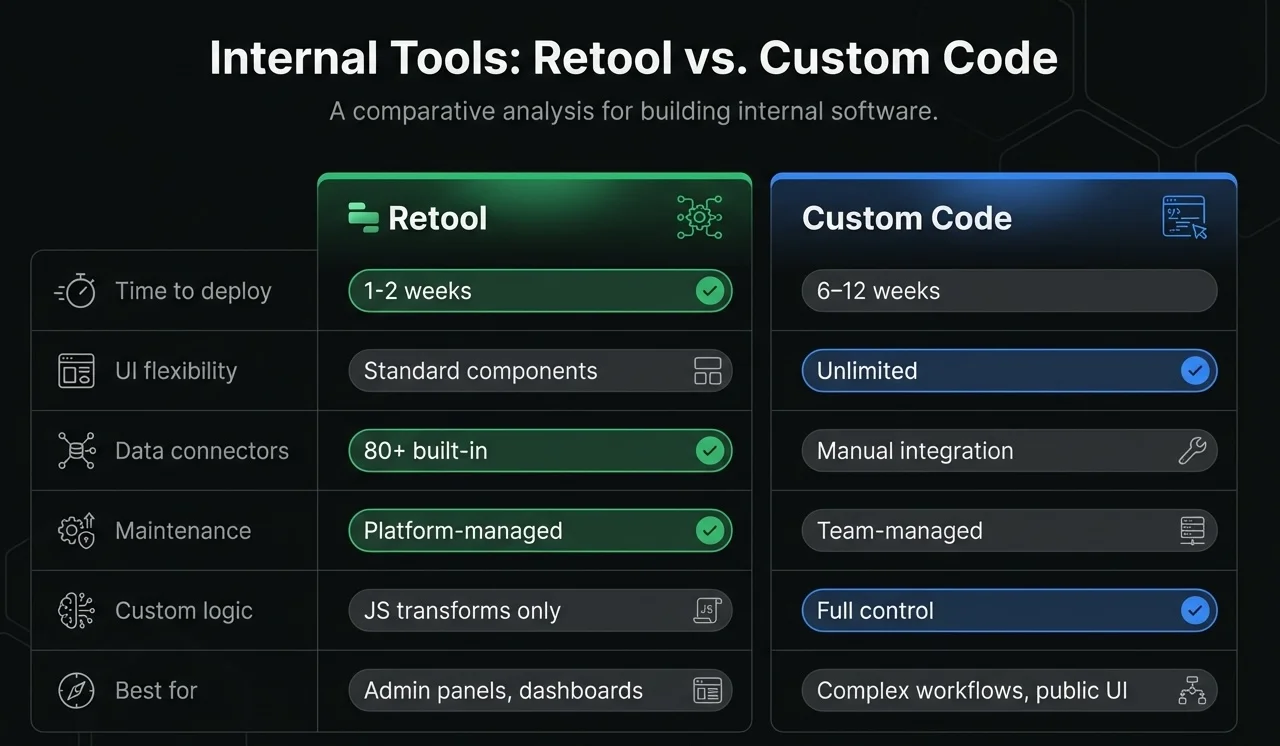
| Factor | Retool | Custom Code |
|---|---|---|
| Core interaction | CRUD on structured data | Complex workflows, real-time behavior |
| User base | Internal ops, support, admin | External users or high-stakes internal power users |
| Time to delivery | Days to weeks | Weeks to months |
| Data sources | Existing APIs and databases | Custom services, streaming, unusual integrations |
| UI requirements | Standard tables, forms, dashboards | Custom visualizations and interaction patterns |
| Dataset scale | Moderate | Large or performance-sensitive |
| Maintenance burden | Lower | Higher |
| Long-term flexibility | Good within platform boundaries | Highest, but you pay for it |
The pricing math most teams skip
Retool pricing scales with seats. Custom apps scale with engineering ownership.
That means either option can become more expensive than it looks if you only compare the first quarter.
With Retool, the trap is assuming per-user pricing stays cheap forever as access expands across departments.
With custom code, the trap is pretending the build cost is the full cost. It is not. You also own maintenance, auth, infrastructure, upgrades, and every UX bug that now belongs to your team.
Run the math over a multi-year window. If a tool will stay small, mostly internal, and structurally simple, Retool often wins by a mile. If it will grow into a core operational product, custom code usually wins eventually, even if it loses on day one.
Three questions to ask before you choose
- Is this mostly a data surface, or is the interface itself part of the product?
- How much of the workflow is standard, and how much is genuinely custom?
- Who will own this tool twelve months from now?
Those questions cut through a lot of noise.
If the answers point toward speed, standardization, and limited complexity, Retool is usually the right start.
If the answers point toward differentiation, performance, and custom interaction, build it properly.
When neither is the right answer
Sometimes the best choice is neither Retool nor custom code.
If the need is basically a shared spreadsheet, use a spreadsheet. If the job is a weekly script, build a script. If a vertical SaaS product already solves most of the problem, buy the software.
Internal tools are supposed to reduce complexity, not create a private software portfolio no one asked for.
The bottom line
The worst internal tools are usually not badly engineered. They are mismatched to the problem.
Teams build custom React apps for workflows that should have been in Retool by Friday. Or they force complex operational software into a low-code box because "faster" sounded good in the kickoff meeting.
Pick the tool that matches the workflow. For a lot of organizations, that means using both on purpose.
If you are working through that decision now, our internal tools practice is built around exactly this tradeoff. We are a Retool Preferred Partner, and we still build a lot of internal products in React. That tells you the answer is rarely ideological.
Need help building something like this?
At Paramint, we build production AI systems, custom software, and internal tools for growth-stage startups, enterprises, and government agencies. We focus on solutions that deliver measurable impact, not just demos.
Get in touch