Replacing an Admin Dashboard With a ChatGPT App
Nazim Amin
March 2026
Most admin dashboards are the same product in different colors: tables, filters, detail pages, bulk actions, and the occasional chart. They work. They also force the operator to think in terms of the interface instead of the task.
What the user wants to do is usually much simpler. They want to say "show me the reviews submitted today that still need delivery," or "pull up this reviewer's average rating," or "refund that order and leave a note," or "compare this week's premium revenue to last week's."
Traditional dashboards make people translate those requests into clicks. A ChatGPT App lets them start with the request itself.
We built one for ReviewMyHinge, and it ended up replacing the admin dashboard for a meaningful slice of day-to-day operations. Here is the architecture, the design decisions that mattered, and the places where the pattern still has real limits.
Why this worked better than another dashboard
Admin work is often investigative, not repetitive.
Operators are not always following the same fixed flow. They are checking status, comparing records, resolving odd edge cases, and asking follow-up questions that depend on whatever they just found. That is exactly where conversational interfaces are strongest.
Instead of navigating between a user table, a review detail page, a payout screen, and an analytics tab, the operator can stay in one thread and ask for what they need next.
That does not make dashboards obsolete. It means some admin work is a better fit for a tool-driven conversation than for another layer of navigation.
What a ChatGPT App actually is
At a high level, the app has three moving parts.
An MCP server. This is the layer that exposes tools the model can call. Each tool has a schema, a description, and a handler that does the real work.
UI resources and widgets. Tool results can render structured interfaces inside ChatGPT instead of dumping raw JSON into the conversation. That is what turns the experience from a debugging console into something an operator can actually use.
The model. The model maps the user's request to the right tool calls, decides when a widget is useful, and keeps the conversation coherent across follow-up turns.
That description is still directionally right, but one detail matters if you are building this today: OpenAI's current Apps SDK guidance is to use the MCP Apps bridge as the default UI bridge, and treat window.openai as a compatibility layer for ChatGPT-specific extras like file uploads, host-owned modals, and checkout flows. That distinction was less explicit when we first built this, but it is the right mental model now.
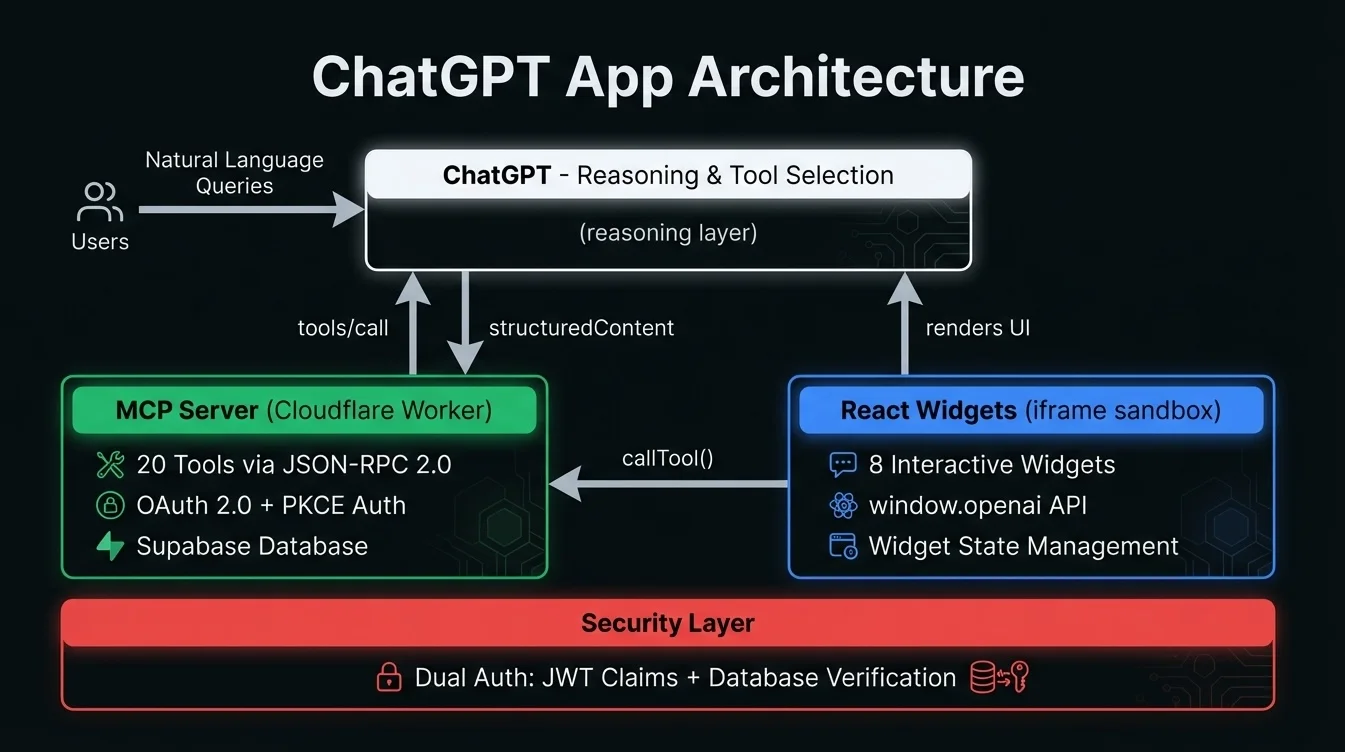
Our architecture
The system runs on Cloudflare Workers and exposes a focused set of MCP tools for admin operations.
Those tools cover user lookup and profile inspection, review lifecycle management, reviewer assignment and payouts, refund and support actions, revenue and performance reporting, and moderation and flag handling.
On the UI side, we built widgets for tables, profile cards, review details, analytics summaries, and confirmation flows.
The important point is not the exact number of tools or widgets. It is the separation of concerns. Tools do the data access and mutations, widgets render structured UI when plain text is not enough, and the model handles the translation between user intent and system actions.
That separation keeps the system usable as it grows. It also gives you better control when something goes wrong, because you can tell whether the failure lived in the tool layer, the rendering layer, or the model's decision-making.
Tool design mattered more than we expected
The first instinct when building an admin connector is to create a few giant tools that do everything.
That is a mistake.
The model performs better when tools are narrow, explicit, and composable. A tool that does one thing clearly is easier for the model to call correctly than a mega-tool with a dozen optional parameters and ambiguous behaviors. We had better results with focused tools like getUserByEmail, listReviewsByStatus, getReviewerMetrics, issueRefund, and getRevenueByDateRange.
That mirrors current Apps SDK guidance as well. OpenAI now recommends separating data tools from render tools so the model can fetch, reason over, and combine the data before deciding whether to render a widget. In practice, that means not attaching a widget template to every tool by default.
That sounds like a small implementation detail. It is not. Once you stop forcing every tool call to immediately render UI, the model gets noticeably better at follow-up reasoning.
The transport and runtime choices
Our app communicates through an MCP server hosted on Workers. The protocol itself is transport-agnostic.
When we built the first version, server-sent events were a practical fit for the deployment shape we wanted. That still works. But if you are building a new ChatGPT App today, it is worth noting that the current Apps SDK docs recommend Streamable HTTP over SSE for new apps, even though both are supported.
That kind of detail matters in technical writing because the platform is moving quickly. If you are publishing about ChatGPT Apps, make sure you distinguish between what your implementation uses and what the current documentation recommends.
How the UI actually talks to the app
This was one of the most confusing parts at first.
The cleanest way to think about it now is that the MCP server returns structured content, optional widget metadata, and private widget-only metadata; ChatGPT delivers tool inputs and results to the widget over the MCP Apps bridge; and the widget can render the result, request more tool calls, and use ChatGPT-specific extensions only where they add real value.
That is slightly more precise than saying "the widget talks to ChatGPT through window.openai." It can, but that is no longer the whole story, and for new apps it should not be the primary story.
Authentication was the hardest part
The core architectural challenge was not rendering data. It was permissions.
An admin app that can inspect user information, manage payouts, or issue refunds cannot treat auth casually. We needed to verify both the person using the app and their current access level for each sensitive action.
The pattern that worked for us was layered. The user authenticates through a one-time password flow tied to a registered email, the server validates a short-lived signed token on each tool call, and sensitive actions still verify role and authorization against the database so a stale token does not grant access a user no longer has.
That extra database check adds friction, but it closes a class of security mistakes that is easy to miss in internal tooling. Admin tools often fail because teams assume "internal" means "low risk." It usually means the opposite.
Where the pattern clearly wins
Three things worked better than we expected.
Ad hoc querying got much faster. Instead of clicking through multiple screens, the operator can ask a question in plain English and refine it naturally.
Context carries across turns. Once the conversation is about a specific user, date range, or review status, follow-up questions become lightweight instead of repetitive.
Widgets made the output trustworthy. Text alone is too squishy for operational work. Once results showed up in tables, metric cards, and structured detail views, the interface felt usable instead of clever.
Where the pattern still loses to a dashboard
It is not a universal replacement.
Latency is real. Model reasoning plus tool execution plus rendering is slower than a conventional dashboard query. For investigative work, that tradeoff is often worth it. For high-throughput queue work, it can be annoying.
Model errors still happen. Even with clear tools, the model will occasionally call the wrong one or misunderstand a vague request. You can reduce that with tighter tool design and good descriptions, but you will not get to zero.
Highly repetitive flows still belong in purpose-built UIs. If the operator needs to process a queue at speed, bulk-edit rows, or use muscle memory across the same screen hundreds of times, the dashboard usually wins.
Audit trails are harder to reason about. We log every tool call and parameter set, which gives us operational visibility. But a conversational audit trail is still less intuitive than "user clicked button X on screen Y at time Z."
When I would use this pattern again
I would absolutely use it again for internal tools where the work is investigative, multi-step, cross-cutting across several data domains, used by a relatively small operations team, and tolerant of some latency.
I would not use it as the primary interface for bulk data entry, rapid moderation queues, highly repetitive workflows, or environments that demand rigid, deterministic interaction logs.
That is the practical lesson. A ChatGPT App is not a better dashboard. It is a different interface pattern, and it is better for a specific category of work.
The bottom line
Replacing part of an admin dashboard with a ChatGPT App was not a stunt. It turned out to be a materially better fit for the kinds of operational questions our team asked every day.
The combination of MCP tools, structured UI, and conversational context is strong. The rough edges are also real: latency, auth complexity, and the fact that some tasks still want traditional screens.
If you are exploring the same pattern, start with read-heavy workflows, keep your tools narrow, separate data tools from render tools, and treat the current Apps SDK docs as required reading, not optional background.
We built this for ReviewMyHinge. If you are working through whether a conversational admin interface makes sense for your operations, our internal tools practice and AI automation work sit right at that intersection.
Need help building something like this?
At Paramint, we build production AI systems, custom software, and internal tools for growth-stage startups, enterprises, and government agencies. We focus on solutions that deliver measurable impact, not just demos.
Get in touchAI Engineering
How to Build an Enterprise AI Agent
How to build an enterprise AI agent that can safely take actions, from scoping its tools and permissions to the authority ladder that earns each autonomous action with evidence.
AI Engineering
Government AI Solutions Have to Explain Themselves
What government AI solutions require beyond accuracy, from decisions people can appeal to records that satisfy FOIA and systems that outlast an administration.
AI Engineering
What a Custom AI Development Company Actually Does
How a custom AI development company differs from an automation agency or an off-the-shelf tool, when a custom build is worth it, and what to verify before you sign.